

Electrical Panel Schedule Tools
Creating automatic lighting, outlet, kitchen, and appliance circuits for the PPX18 electrical panel schedule
What these tools automate
The PPX18 Electrical Panel Schedule Tools create circuit notes in the plan and corresponding entries in the Electrical Panel schedule. The note's circuit type supplies the amperage and pole configuration, while its placement and leader connection help determine the name reported to the schedule.
This allows the floor plan callout and the panel schedule to remain connected. Add and connect the circuit note in the plan instead of typing a separate static entry directly into the panel schedule.
Circuit tools in the toolbar
The toolbar includes dedicated circuit-note tools for 15-amp lighting circuits, 20-amp outlet circuits, double-pole 20-amp circuits, double-pole 30-amp circuits, and double-pole 50-amp circuits.
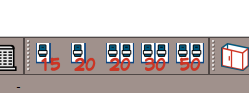
15-amp lighting circuit
Place a 15-amp circuit note in a room or lighting area that needs its own lighting circuit. The room context is used to create a practical schedule name such as Bath Lights.
20-amp outlet circuit
Place a 20-amp circuit note where a room or outlet group requires an isolated outlet circuit. The room context can produce a name such as Bath Outlets.
Double-pole 20-amp circuit
Use the double-pole 20-amp tool for equipment or kitchen applications that require that circuit type. Confirm the actual appliance and project requirements before selecting it.
Double-pole 30- and 50-amp circuits
Use the double-pole 30-amp and 50-amp tools for cooking, laundry, or other equipment requiring the applicable two-pole circuit. Connect the note's leader to the appliance or to the cabinet containing the appliance so PPX18 can build a specific schedule name.
A typical residential workflow
Place 15-amp circuit notes in the rooms or lighting groups that require separate lighting circuits.
Place 20-amp circuit notes for isolated outlet circuits.
Place the appropriate double-pole 20-amp circuit for the intended kitchen or equipment circuit when required.
Use the supplied dishwasher, garbage-disposal, and hood-vent outlet tools. These tools create their own circuit entries in the panel schedule. The hood-vent tool can also be used for the applicable microwave-hood equipment.
Place double-pole 30-amp or 50-amp circuit notes for the cooking or laundry equipment that requires them, then connect each leader to the correct appliance object.
Review the Electrical Panel schedule and confirm that every circuit number, amperage, pole configuration, voltage description, and automatic name matches the intended equipment.
Connect the leader to the object
A circuit note can inspect the object connected to its leader. When the leader is attached to supported equipment, PPX18 uses that object to create a more useful panel-schedule name.
Built-in recognition includes washer and dryer objects and cabinets containing an oven, microwave, or range. When an appliance is represented by a cabinet, connect the leader to that cabinet rather than merely pointing at nearby text or empty space.
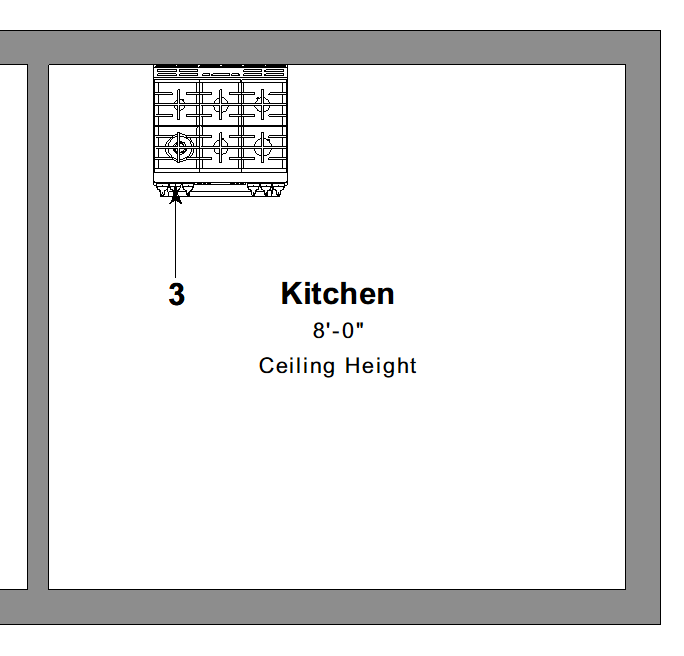
The circuit connection is not limited to one breaker size. Any compatible circuit note can use the connected object to create its automatic name. Select the circuit amperage and pole configuration that match the actual equipment, then use the connection for naming.
Range example
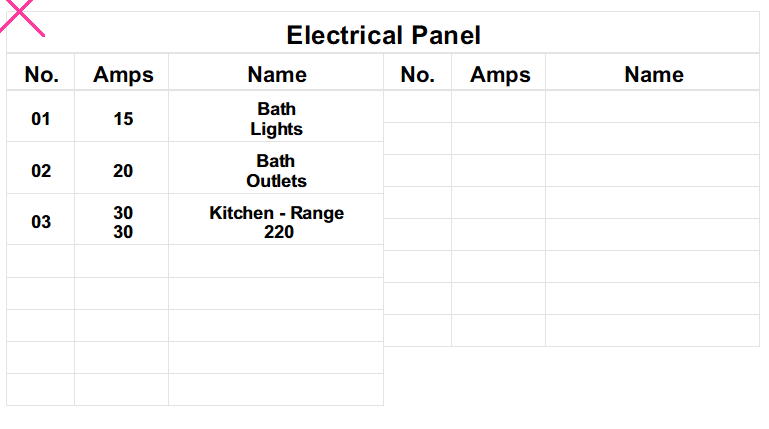
In the example, circuit 3 is a double-pole 30-amp note connected to the kitchen range. The Electrical Panel schedule reports two 30-amp pole entries and names the circuit Kitchen - Range with a 220 designation.
Override the reported circuit name
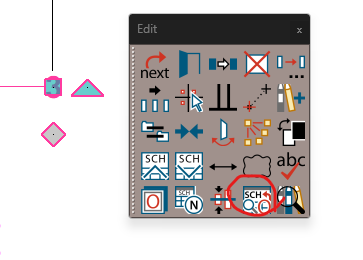
If the automatic name is not appropriate, change the circuit note rather than editing the schedule text. Select the circuit note, open its specification dialog, and go to Object Information.
In Custom Object Fields, select Macro Input 2.
Enter the preferred circuit name in the Field Value box.
Click OK and allow the Electrical Panel schedule to reevaluate.
Macro Input 2 controls the name reported to the panel schedule. Changing it overrides the automatic name while preserving the connected circuit-note and schedule system. It does not change the selected amperage, pole configuration, or the actual electrical requirements of the appliance.
Final checks
The panel schedule is an automated documentation aid. Verify each circuit against the appliance data, required voltage, breaker size, conductor requirements, project design, applicable electrical code, and authority having jurisdiction. Correct the circuit note or its connected object and allow the schedule to reevaluate instead of manually overwriting the generated schedule.
Not included: these circuit tools are supplied as toolbar and library tools, neither of which is included with Essentials.
Essentials package: a stripped-down working plan, companion As-Built file, Title Block and Spec Plan, plus Rexel ANSI B (11 × 17) and Rexel ARCH D layouts. It includes no PPX18 toolbars or library items.