

Pro Plan X18

The Rabbitt Design Pro Plan is a coordinated set of Chief Architect templates, layouts, toolbars, and associated library objects built to keep you in flow and help you produce professional construction documents faster.
Designed for kitchen and bath designers, architectural designers, drafters, design-build professionals, and architects, the system brings the major parts of Chief Architect together into one organized production workflow.
The Pro Plan focuses on automating complex and redundant tasks, reducing repetitive setup, and helping limit liability caused by user error, missed settings, and documentation omissions.
Unlike typical templates assembled from project files, the Pro Plan has a dedicated four-month development cycle focused specifically on testing, refinement, automation, graphics, and workflow improvements.
The goal is simple: spend less time managing Chief Architect and more time designing and producing construction documents.
-
Construction Details & Annotation System
82 Flex Construction Details
Dynamic construction details driven from a central annotation system
Update annotations across your construction details from one easy-to-use location instead of editing details individually
Centralized annotation controls allow complete detail sets to be configured in minutes instead of hours
Stackable, GUI-switchable detail section system
Build complete wall and section assemblies by swapping linked detail views drawn in the same XY space
Detail geometry and annotation controls work independently, allowing assemblies to be changed quickly without rebuilding the entire section
Macro-driven annotation system allows broad project changes to be made in minutes
Quick-switch controls for code references, design loads, construction requirements, and other project-specific information
Window & Door Automation
Window & Door Quick Tools
Dynamic window and door labels that automatically change based on the view, object condition, and remodel workflow
Labels adapt automatically for new, existing, demo, and out-of-scope conditions
Window and door labels dynamically coordinate their reported information with schedules
Remodel conditions automatically affect both the drawing label and the values reported to schedules
Labels automatically stack based on available window or door width and the number of characters being displayed
Automatic formatting reduces the need to manually reposition or reformat labels as the design changes
Configurable label parsing, including prefixes, suffixes, dimensional formatting, and other reporting options
Context-aware label display switching based on the current Saved Plan View
Automatic window egress checking
Egress requirements are evaluated automatically and reported directly to the window schedule for verification
Superscript-style full-height font system provides compact architectural notation while maintaining readability
Schedule and Label Quick Tools for faster access to common documentation controls
Dynamic Room Labels
Dynamic room labels automatically respond to changes in room size
Room names automatically abbreviate when the available space becomes too small for the full label
Labels automatically remain centered within the room as room geometry changes
Smart ceiling-height reporting updates with the model
Bold room names with secondary information displayed in a normal-weight font for a polished, rich-text appearance
Built entirely with standard Chief Architect text rather than Rich Text
Custom font and text-style system recreates the visual hierarchy of Rich Text while remaining scalable and automation-friendly
Font styles can be changed globally to better match an individual company's branding
Additional custom room types provide room naming conventions more consistent with common national architectural and construction-document standards
Custom room types integrate with schedules, room labels, and formatting rules
Schedules & Documentation
Standardized schedule text formatting throughout the system
Labels and schedules are designed to work together rather than function as separate documentation systems
Dynamic reporting minimizes duplicated input between plans, labels, and schedules
Schedule formatting is coordinated across architectural, kitchen and bath, remodel, and construction-document workflows
Automated reporting helps reduce omissions and inconsistencies caused by manually maintaining the same information in multiple places
Layouts & Construction Documents
Fully integrated with all 18 included Pro Layout Templates
Layouts are pre-populated with linked views from the plan file, allowing the construction-document set to begin populating as soon as you begin drawing
Plans, elevations, sections, schedules, details, and supporting documentation are coordinated with the layout system
Layout organization is designed to minimize repetitive setup between projects
Pro Architectural Construction Document Set included for full-scope architectural construction documents
Pro Architectural layouts use the National CAD Standard (NCS) sheet identification convention for architectural sheet organization and labeling
Dedicated layouts support residential architectural, remodel, kitchen and bath, and design-build workflows
Layout box auto-labeling reduces repetitive sheet annotation
Integrated view-management tools make it easier to keep plan and layout documentation coordinated
Saved Plan Views & Redlining
Redline Saved Plan View for markup and coordination workflows
Dedicated redline camera views
Saved Plan Views coordinate the appropriate layers, defaults, annotation behavior, and documentation settings for each type of drawing
Context-aware automation allows labels and other documentation to change depending on the view being produced
Braced Wall Panel System
Dynamic Braced Wall Panel system
IRC-indexed fastening and construction schedules
Rule-based Braced Wall Panel reporting designed for extremely fast documentation
Centralized controls allow code references and design loads to be changed without manually rebuilding individual annotations
Integrated reporting keeps Braced Wall Panel documentation coordinated with the rest of the construction-document set
Automatic Area & Ventilation Calculations
Automatic Foundation Vent Net Free Area Calculator
Automatically calculates required foundation ventilation and provides Net Free Area reporting based on the vent products being specified
Automatic Roof Vent Net Free Area Calculator
Calculates roof ventilation requirements and available Net Free Area from the selected venting system
Vent calculations integrate directly into the documentation workflow rather than requiring separate spreadsheets or manual calculations
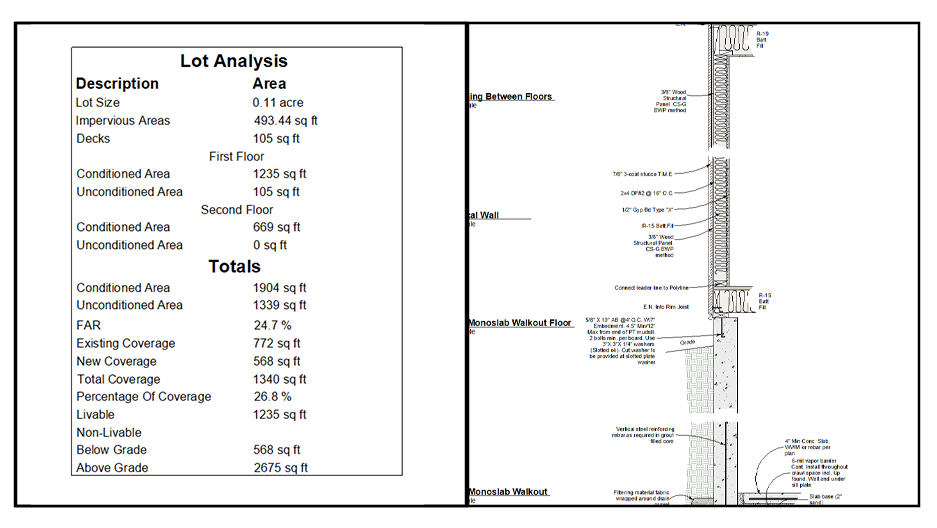
Automatic lot area analysis and reporting
Automated area-analysis tools reduce repetitive calculations and keep reported project information coordinated with the model
Optimized Materials
Pro Plan materials are optimized specifically for efficient Chief Architect projects
Textures use modern WebP image formats for significantly improved compression
Texture resolutions are intentionally controlled to avoid unnecessarily large project files
Materials remain visually strong in renderings while reducing file size
Smaller texture assets improve project shareability and reduce the amount of data transferred between users
Optimized assets can also make Chief Architect project backups faster and more manageable
Library & Production Tools
Over 1,200 curated library items
Library objects are selected and optimized to support architectural, kitchen and bath, drafting, documentation, and presentation workflows
Suite of coordinated Quick Tools provides fast access to commonly used commands, annotations, labels, schedules, views, and production tools
Tools, templates, layouts, library objects, macros, and annotation systems are designed as one coordinated production environment rather than independent add-ons
Built to Keep You in Flow
The Pro Plan is designed around a simple idea: you should be able to keep drawing while the documentation keeps up with you.
Room labels resize, abbreviate, and reposition themselves. Window and door labels change based on available space, view type, and remodel status. Schedules receive coordinated information from those same systems. Construction-detail annotations can be driven from a central location. Section assemblies can be swapped instead of rebuilt. Layouts begin populating from linked plan views as the project develops. Area, egress, roof ventilation, and foundation ventilation calculations are handled by dedicated automation systems.
The goal is not simply to make Chief Architect look different. It is to automate the complex, repetitive, and easily overlooked portions of producing construction documents so the designer can remain focused on the project while reducing opportunities for user error and documentation omissions.
-
One-click tool in toolbar.
Quickly calculates impervious surfaces, conditioned/unconditioned spaces, lot coverage, and new vs existing areas.
Now includes:
Lot size and bearing-aware lot polyline support
Composite impervious areas based on room name
Separate first/second floor breakdowns
Livable/non-livable and above/below grade areas
FAR, percent lot coverage, and more
Fully adjustable polyline schedule logic
-
Windows and Doors
Labels truncate and stack when the window or door is below a user-defined width.
Framing views display formatted rough opening size.
Order overview mode shows enlarged schedule numbers.
One-click tools to mark items as existing, TBR, or N.
Supplier field can override or supplement the label type code.
View-based formatting logic adapts per saved plan view.
Window Quick Tools allow type, grid, arch, or height changes with one click or marquee swipe.
Room Labels
Show ceiling height, floor adjustment, or vaulted status.
Toolbar tools allow one-click switches to "No Work" or abbreviations.
Legend-based labels show room number and match legend schedule.
Swipes can toggle conditioned/unconditioned or coverage logic.
Project Designation & Label Settings
Dedicated Saved Plan View manages all label and logic preferences.
File name checker interprets suffixes like -N and -AB to drive logic.
CSV-imported designation allows formatted client/designer data population.
Global number formatter allows unit format control on reported macro values.
-
Built around fill styles—spray in pattern, link text, annotation done.
Add your own details using existing system logic.
Dynamically-linked callouts update page and detail numbers.
Thousands of development hours. Constantly updated.
Now with additional subfolders and better organization.
-
The Annotation Tool is a specialized utility in the Pro Plan that allows you to auto-generate annotations by linking a leader line from a note or text box to any object in the plan. By default, the Pro Plan includes a dedicated note tool that works seamlessly with this system. Once a leader is drawn, the Annotation Tool references object-specific logic to report accurate, context-based information.
For architectural designers, this means that attaching a leader to a staircase will automatically report details such as rise, run, and number of treads. Linking it to a crawl space will return head clearance, while connecting it to a foundation wall will output specifications about that wall. If no object-specific logic is defined, the system defaults to identifying the type of object and reporting its automatic description, when applicable.
When placed independently (without a leader), the tool assumes you are calling out floor finishes. The tool is also remodel-aware: it checks the plan file name for “New” or “Existing” to understand whether it should switch annotations to represent demo versus proposed conditions in a remodel workflow.
The Annotation Tool can be used across plan views, elevation views, and 3D views. When combined with Kitchen Tools, it gains additional capabilities: for example, a two-drawer base sprayer cabinet can automatically report “pots and pans” as its annotation. These annotations are driven by object-specific data fields and can be saved into the library, ensuring consistent and repeatable annotation standards.
Beyond native capabilities, the Annotation Tool integrates with other Rabbitt Design packages, such as RSMeans or Buildertrend/Jobtrend integrations, allowing annotations and schedules to be driven directly from project management systems or CRM specifications.
Now in its second year of development, the Annotation Tool continues to evolve, offering a future-ready solution that reduces user input errors by pulling from known parameters and automating annotations through single-click workflows.
Bulleted Listing (condensed)
Link a leader to auto-annotate any object
Reports stairs (rise, run, treads), crawl space clearance, wall specs, and more
Remodel-aware: auto-switches for demo vs. proposed plans
Defaults to floor finish callouts when placed without a leader
Works in plan views, elevations, and 3D views
Kitchen Tools integration: object-specific annotations (e.g., “pots and pans”)
User-configurable + repeatable by saving annotated objects to the library
Reduces input errors with data-driven automation
Compatible with RSMeans, Buildertrend, Jobtrend, and more
Actively developed: expanding feature set for future-proof annotation
-
Macro-based elevation camera naming
HDRI library included for realism
Redline camera mode for plan or 3D annotations
-
Central dimension system with NKBA auto-switching in interior elevations
Defaults for counter-to-counter, wall-to-wall, casing-inclusive layouts
Now includes electrical fixture dimensioning
Manual tools smartly snap only to useful geometry
Tight tolerances and optimized for tab/enter workflows
-
3D materials for board & batten, stone, and brick with full assemblies
Ivy and lattice via material regions
New comp shingle roof stack using partial transparency
Overhauled tile and countertop realism
New landscape fills for terrain, paths, and planting plans
-
Pony walls for walkout basements
Tools for siding/furring, stone, brick, board & batten
Hot tub and pool systems with paired room logic
Post-to-beam porch/stair/railing extensions
Additional doors, stair styles, and parapet tools
-
Populate via simple text or CSV import
Auto-formats layout and plot plan metadata
Built-in Project Info tools integrate with page headers and client blocks
NEW: G1 Layout Sheet spec toggles for California Code, IRC, and Canadian National Code.
NEW: Plan View for Design Loads—swap reference files for jurisdictional changes with a click.
-
Only one Master Default Set to reduce clutter
Existing Plan Layer Set ready for overlay referencing
Graphical layers pruned to essentials for better collab
Toolbar-linked furred/stem/siding wall types for fast access
-
Kitchen Quick Tools* Single click actions that cut out hours of edits in dialog boxes
Robust Cabinet Schedules with door and drawer information, box volume, and custom cabinet pricing
Automatic NKBA Left/Right/Center dimensions for perfect single click elevation dimensions
Multiple NKBA Dimension defaults. Dimension to counters only, dimensions wall to wall, and auto interior dimensions offset to exterior for ANSI B Kitchen designs
Dynamic installation spec CAD details for quick installation diagrams
Anno Tool* for quick and automatic annotations without typing
Custom lighting symbols for more realistic renderings
Dialed in camera settings for immediate renderings from your designs
Custom backdrops for adding new tonal qualities to your renderings
Custom bath and shower walls with fixtures for easy creation of showers to include hardware curbs and more*
Layersets and Saved Plan Views have all been considered and established taking all of the guess work out
-
Over 1,000 items in the Kitchen Tools package
Single-click actions replace dozens of dialog box edits
Instant cabinet face configuration changes
Marquee edits apply settings across multiple cabinets at once
Batch changes: materials, toe kicks, and more in one step
Stack cabinet features in just 2–3 clicks
Icons redesigned for speed and clarity
Full integration with macro labeling and style palette tools
Request a sample Kitchen Tools package to explore the workflow
-
Work with Kitchen Tools and label based on a cabinet match system.
Labeling is dynamic and changes with Works with Kitchen Tools using a cabinet match system
Dynamic cabinet labels: minimal input, maximum accuracy
Match label system analyzes face/appliance/insert configurations
Fully user-configurable to match cabinet vendor callouts + codes
Dynamic prefix, suffix, or full replacement without breaking automation
Separate global defaults + per-cabinet overrides for flexibility
Second-to-none labeling system: thousands of hours in development
Reduces annotation time and liability from user error
-
The Annotation Tool is a specialized utility in the Pro Plan that allows you to auto-generate annotations by linking a leader line from a note or text box to any object in the plan. By default, the Pro Plan includes a dedicated note tool that works seamlessly with this system. Once a leader is drawn, the Annotation Tool references object-specific logic to report accurate, context-based information.
For architectural designers, this means that attaching a leader to a staircase will automatically report details such as rise, run, and number of treads. Linking it to a crawl space will return head clearance, while connecting it to a foundation wall will output specifications about that wall. If no object-specific logic is defined, the system defaults to identifying the type of object and reporting its automatic description, when applicable.
When placed independently (without a leader), the tool assumes you are calling out floor finishes. The tool is also remodel-aware: it checks the plan file name for “New” or “Existing” to understand whether it should switch annotations to represent demo versus proposed conditions in a remodel workflow.
The Annotation Tool can be used across plan views, elevation views, and 3D views. When combined with Kitchen Tools, it gains additional capabilities: for example, a two-drawer base sprayer cabinet can automatically report “pots and pans” as its annotation. These annotations are driven by object-specific data fields and can be saved into the library, ensuring consistent and repeatable annotation standards.
Beyond native capabilities, the Annotation Tool integrates with other Rabbitt Design packages, such as RSMeans or Buildertrend/Jobtrend integrations, allowing annotations and schedules to be driven directly from project management systems or CRM specifications.
Now in its second year of development, the Annotation Tool continues to evolve, offering a future-ready solution that reduces user input errors by pulling from known parameters and automating annotations through single-click workflows.
Bulleted Listing (condensed)
Link a leader to auto-annotate any object
Reports stairs (rise, run, treads), crawl space clearance, wall specs, and more
Remodel-aware: auto-switches for demo vs. proposed plans
Defaults to floor finish callouts when placed without a leader
Works in plan views, elevations, and 3D views
Kitchen Tools integration: object-specific annotations (e.g., “pots and pans”)
User-configurable + repeatable by saving annotated objects to the library
Reduces input errors with data-driven automation
Compatible with RSMeans, Buildertrend, Jobtrend, and more
Actively developed: expanding feature set for future-proof annotation
-
Library fully retagged using 5-part system: Room > Category > Option > Keywords > Delimiters
Improved search accuracy and navigation
Icons and symbols refined for fast scanning
-
Rabbitt Design Discord: community of Pro Plan experts
Dedicated Rabbitt Design Forum (rabbittdesign.net)
“Users of Chief Architect” Facebook group (largest community)
Continuously evolving Rabbitt Design System Manual
Membership + YouTube channel with regular live sessions
Discord community access
Automated support tools
Update notifications
Peer collaboration
Climate Zone Index support (CA, WA, MI—more added regularly)